Real Drum electronic drums set
- 4.5
- Rating
- 100.00M
- Installs
- Free
- Price
 Analysis by App-foxy
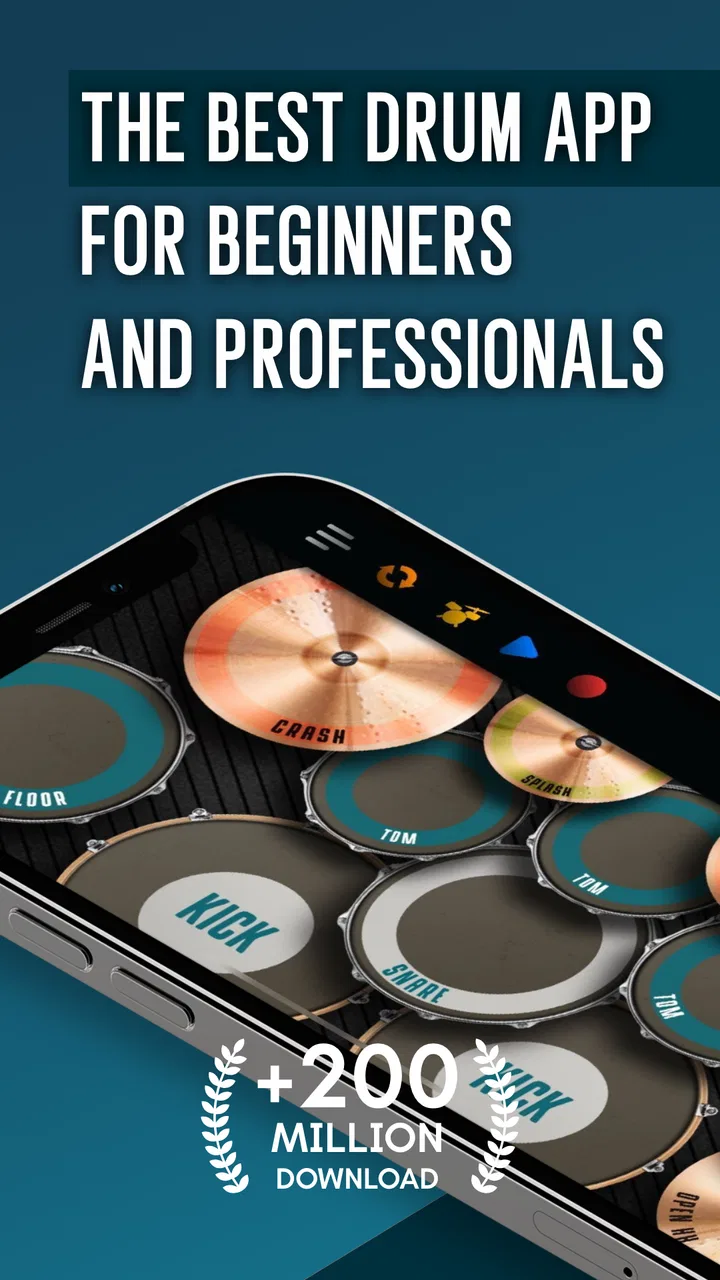
Real Drum is the kind of music game I open when I want to tap out a rhythm without setting up a physical kit. It turns an Android or iOS device into a compact electronic drum set, so the screen becomes a place to practice timing, experiment with beats, or simply play along with the mood of the moment. I found it much more approachable than a full drumming course, but also more limited than real hardware once I wanted a convincing sense of foot control and physical rebound.
That balance is important. This is not a replacement for a teacher, an acoustic kit, or a serious electronic drum controller. It is a touch-based music game from Kolb Apps that makes drumming immediately available, with lessons intended to help beginners build familiarity. The app is free to download, carries an Everyone age rating, and has reached over 100 million installs with a 4.4 average from around 1.6 million ratings. Those figures suggest that its appeal is broad: people can understand the basic idea in seconds, even if they never plan to become working drummers.
How Real Drum feels when I use it
The first thing I notice is how quickly the app removes the usual barriers. There is no stool to adjust, no cymbal stand to assemble, and no neighbor to worry about before trying a simple pattern. I can place the phone or tablet in front of me, use my fingers as sticks, and begin exploring the kit. That makes it useful for short sessions, especially when I have only a few spare minutes and want something more active than listening to music.
You May Also Like

 AccuWeather: Weather Radar
AccuWeather Review: A Quick, Clear Forecast for Everyday Decisions
For everyday plans, the best forecast is the one you can understand quickly. AccuWeather makes rain timing, radar, and local conditions easy to act on, with a few trade-offs.

 Hill Climb Racing
Why Hill Climb Racing Still Turns Crashes Into One More Run
A tiny car, a bumpy hill and one more upgrade: Hill Climb Racing keeps resurfacing because its simple chaos makes every near-miss feel personal.

 AliExpress - Shopping App
AliExpress Makes Global Shopping Feel Personal, but Shoppers Bear the Risk
AliExpress turns a global marketplace into a pocket-sized discovery engine. Its reach is useful, its shopping loop compelling, and its trade-offs easy to miss.

 Lords Mobile: Kingdom Wars
Lords Mobile Is a Kingdom-Building Routine, Not a Quick Match
A case-by-case verdict on the building, battles, device demands, and social commitments that make Lords Mobile rewarding for some players and exhausting for others.

 PDF Scanner app - TapScanner
TapScanner Makes Paperwork Easier to Capture, Check, and Share
TapScanner makes scanning with a phone feel less like a rescue operation and more like a dependable step in getting work done. Its capture tools are useful, though not flawless.

 Block Blast!
 Shows How Much a Puzzle Game Can Leave Out
A quiet grid game shows why puzzle players increasingly value instant clarity, repeatable skill and low-pressure play—and where the genre still needs to catch up.
More From Our News Desk
View All News


The touch interface also changes the way I think about rhythm. On a physical kit, my hands and feet work together across separate surfaces. Here, everything happens on one screen, so I concentrate more on where and when I tap. That is helpful for learning basic coordination, but it can also hide weaknesses. A pattern that feels controlled on glass may become much harder when I have to move between a real snare, hi-hat, kick pedal, and cymbal.
I would describe the sound and interaction as immediate rather than deeply realistic. The app gives a satisfying response for casual play, and the compact layout makes experimentation easy. Still, a phone screen cannot provide the same rebound, volume, or physical separation as a drum set. Anyone judging it as a substitute for hardware will probably be disappointed. Anyone treating it as a portable rhythm playground will understand its strengths much faster.
Lessons are most useful when I slow them down
The lesson material is the part I would point to first for a beginner. It gives the app more direction than a simple collection of pads, because I am not left wondering what to practice next. The best way to use those exercises is not to rush through them. I repeat a pattern until my hands stop searching for the next surface, then try it again while keeping the pulse steady instead of chasing speed.
A practical routine is to spend a few minutes copying a lesson, followed by a short period of free playing. The first part builds recognition; the second reveals whether I actually remember the movement. If I can only perform the sequence while staring at each pad, I treat that as a sign to simplify the pattern and rebuild it. This approach makes the lessons more valuable than simply completing them once.
Another useful habit is to practice one hand at a time when a rhythm feels crowded. I start with the dominant hand, add the other hand only after the main pulse feels stable, and then work on the accents. That is not a magic shortcut, but the touch format makes it easy to isolate a problem without unpacking a complete kit. The limitation is that the screen cannot reproduce every physical technique, so progress here should be understood as rhythm training rather than complete drumming education.
A realistic everyday use case
Imagine having a long wait before an appointment. I can use a tablet, put on headphones, and spend ten minutes working through a lesson rather than mindlessly scrolling. I might begin with a simple beat, test a variation, and finish by repeating the original pattern to see whether the change disturbed my timing. That is a realistic role for this game: a small, private practice tool that turns idle time into a little musical activity.
It is also useful for someone who is curious about drums but has not decided whether to invest in equipment. Before buying sticks, pedals, or a practice pad, a new player can discover whether keeping a steady pulse is enjoyable enough to pursue. The experience will not answer every question about real drumming, but it can reveal whether the basic hand coordination feels rewarding or frustrating.
For children and families, the Everyone rating makes the app easier to consider as a casual music activity. I would still guide a younger player toward short sessions, because tapping quickly can become repetitive rather than educational. The strongest results come when someone gives the activity a small goal, such as repeating a rhythm cleanly, instead of treating it as constant random tapping.
Progress, pressure, and the cost of playing
The free entry point is one of the clearest reasons to try Real Drum. I can test the core idea without paying first, which matters for an app that sits somewhere between a game and a practice aid. The purchase range is listed as $0.99 to $18.99 per item, so spending can vary depending on what I choose to buy. I would approach that carefully and decide whether an extra purchase changes my practice enough to justify it.
That purchase context also affects how I judge progress. A lesson feels worthwhile when I use it to improve timing, not when I measure success by how much content or customization I have unlocked. If I start feeling pressure to spend simply to make the experience feel complete, I would pause and return to the free material. A music app should support curiosity, not turn every small improvement into a reason to buy something.
Parents should pay particular attention to the purchase range before handing the device to a child. The age rating is Everyone, but an age rating describes suitability, not a family’s preferred spending rules. I would use the device’s purchase controls and agree on expectations in advance. That is a simple precaution, especially because a child may view an optional item as part of the game’s normal progression rather than as a separate expense.
The pressure in this kind of app is usually self-created. There is a temptation to play faster, tap more dramatically, and judge a session by how busy it sounds. I get better results when I reverse that instinct: I play fewer notes, listen for an even pulse, and only add complexity when the basic beat remains comfortable. The game format makes quick entertainment easy, but the lesson format rewards patience more than frantic speed.
Where the touch screen helps and where it gets in the way
Touch controls are convenient because the kit is always close at hand. They are also a major trade-off. My fingers can move across the display quickly, but they do not receive the physical feedback that tells a drummer where a stick has landed or how hard it has rebounded. That makes quiet control, repeated strokes, and foot coordination difficult to represent faithfully.
Screen size matters as well. On a larger device, the pads are easier to distinguish and my hands feel less cramped. On a phone, portability improves, but I have less room to keep several surfaces under my fingers without looking down. I would choose the largest comfortable screen available for lessons, while keeping a phone for quick rhythm sessions. This is one of the few practical decisions that can noticeably change the experience without changing the app itself.
Headphones can make a short session more focused, particularly when I am repeating a pattern and do not want the phone speaker to distract me. They also make the activity more private. That said, headphones cannot solve the fundamental issue of touch feedback. They improve listening, not the physical realism of the kit.
How fair is it compared with other ways to learn drums?
Compared with a basic metronome, Real Drum is more engaging because I am actively striking different parts of a kit rather than hearing a click alone. A metronome remains better for checking whether I can hold a tempo without relying on visual pads or lesson prompts. I use the app when I need motivation and variety, then switch to a simple pulse when I want to test whether the rhythm has become internal.
Compared with a drum machine, this game feels more hands-on. A drum machine is usually better for building a programmed backing pattern and arranging sounds, while Real Drum puts my attention on performing the beat. If my goal is composition, a dedicated music-making tool would be the more suitable choice. If my goal is to practice tapping a pattern directly, the drum set layout is more immediate.
Compared with a practice pad, the app offers more visual variety and a lower barrier to entry, but the pad wins on technique. A practice pad teaches rebound, stick angle, grip, and the physical discipline that touch cannot provide. I would recommend Real Drum as a companion before or between hardware sessions, not as a replacement for them. It is especially fair to beginners who want to explore rhythm without committing to equipment, but less fair to players expecting realistic drumming mechanics.
Compared with private lessons, the app is obviously more affordable at the starting point and easier to use whenever I have time. A teacher can hear uneven timing, correct posture, and adapt exercises to a student’s specific weakness. Real Drum cannot offer that personal correction. The app’s lessons can organize practice, but they do not remove the need for feedback if a player wants dependable long-term technique.
Who should use it, and who should skip it?
I think it suits curious beginners, casual music fans, and players who want a portable way to work on basic rhythm. It also makes sense for someone deciding whether drums are worth exploring before buying physical gear. The free price makes that trial less intimidating, while the Everyone rating keeps it accessible for a broad audience.
I would skip it if I already own an electronic kit and expect the same level of control from a phone. I would also choose another option if my main goal is recording polished drum parts, learning advanced footwork, or developing stick technique. Those goals depend on tools and feedback that a touch-screen game is not designed to provide.
It may not be ideal for people who dislike visual tapping or who need very precise physical response. The app can make a rhythm feel successful because the taps are easy to place, even when the movement would not transfer smoothly to hardware. That does not make it misleading; it simply means I need to keep the learning claim in proportion to the tool.
What I would check before spending
The current version is 11.15.3, and the app supports devices running Android 7.0 or newer. Those details are useful when deciding whether an older phone or tablet is suitable. I would also check the device’s available space and screen comfort in ordinary use, because a cramped display can matter more to lessons than raw portability.
I would begin with several free sessions before considering any in-app purchase. That gives me enough time to answer the important practical questions for myself: Do the controls feel comfortable? Can I read the lesson patterns easily? Do I enjoy repeating a rhythm, or do I prefer spontaneous tapping? If the answer to those questions is no, spending more will not fix the basic mismatch.
I would also keep expectations clear about what progress means. Completing a lesson inside the app is not the same as being ready to play a full song on a real kit. A better test is whether I can keep a simple pulse, switch between surfaces without losing time, and repeat a pattern after a short break. Those are modest but meaningful signs that the app is helping rather than merely entertaining me.
The large audience is reassuring in one narrow sense: this is not an obscure experiment that nobody uses. With around 21 thousand written reviews alongside its broad install base, it has clearly attracted sustained attention. Still, popularity cannot tell me whether the touch layout suits my hands or whether the lesson style matches my learning preferences. I treat those as personal tests, not as conclusions borrowed from a rating.
My trust verdict after using the drum set
Real Drum earns my recommendation as a free, low-pressure way to explore drumming and practice simple rhythmic ideas. Its strongest quality is accessibility: I can start quickly, work through lessons, and use spare moments for something musical. The app is at its best when I treat it as a focused rhythm game with educational value, rather than promising myself that it will recreate every part of a real drum kit.
I also appreciate that the spending decision can remain separate from the basic trial. Since individual in-app purchases range from $0.99 to $18.99, I would not buy automatically. I would first identify a specific benefit I want and decide whether the app has already become part of my routine. If it has not, keeping the free experience is the sensible choice.
My main reservation is the gap between tapping a screen and playing physical drums. It affects coordination, technique, and the feeling of control. For a learner who wants serious musicianship, I would pair this game with a practice pad, a metronome, or guidance from a teacher. For someone who wants a convenient introduction, a quick creative break, or a way to test their interest, that gap is acceptable.
My final view is simple: Real Drum is worth trying when accessibility matters more than realism. I would recommend it to a friend who wants to discover whether drum rhythms are enjoyable, especially before spending on hardware. I would not recommend relying on it alone for advanced training. Used with honest expectations, it is a useful little music game that can turn a phone or tablet into a surprisingly inviting first step.
FAQs for Real Drum electronic drums set
01What features does the Real Drum app offer?
The Real Drum app provides a comprehensive virtual drumming experience with customizable drum kits, high-quality sound samples, and an intuitive interface. Users can choose from various drum styles, record their sessions, and even play along with their favorite tracks. The app is suitable for both beginners and experienced drummers.
02Is the Real Drum app suitable for beginners?
Yes, the Real Drum app is designed to be user-friendly, making it ideal for beginners. It offers tutorials and practice modes to help new users learn drumming basics. The intuitive layout allows users to start playing instantly, even with little to no prior experience.
03Does the Real Drum app require an internet connection to function?
The core functionalities of the Real Drum app, such as playing and recording, do not require an internet connection. However, an internet connection may be needed to access additional features like downloading new drum kits or backing tracks, and for sharing your recordings online.
04Can I customize the drum kits in the Real Drum app?
Yes, the Real Drum app allows users to customize their drum kits. You can rearrange the drum components, change their sizes, and select different sounds for each piece. This level of customization helps create a personalized playing experience tailored to individual preferences.
05Is the Real Drum app free to use?
The Real Drum app is available as a free download, offering basic features at no cost. However, it may include in-app purchases for additional content, such as premium drum kits or features, and may also display ads. Users can opt for these purchases to enhance their experience.
Pros
- Intuitive interface for beginners.
- Wide range of drum kits available.
- Customizable sound settings.
- Responsive touch sensitivity.
- Free to download and use.
Cons
- Contains in-app ads.
- Limited free features.
- Requires internet for updates.
- May lag on older devices.
- Sound quality varies by device.

Real Drum electronic drums set
Gallery